
C5 Cluster: twelve scanners that work as one
Twelve ESP32-C5 boards and a manager board that wardrive together for Azimuth. They split the Wi-Fi channels between them, take turns scanning BLE, and keep going if my phone disconnects.
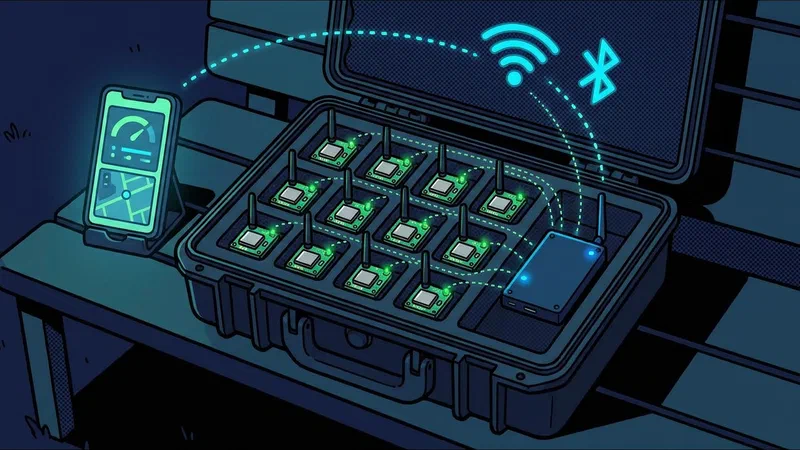
The C5 cluster is the biggest radio in Azimuth. It’s twelve XIAO ESP32-C5 boards and one Waveshare C5 board that runs them. They aren’t twelve separate loggers. The manager tells each board what to listen to, so they cover the Wi-Fi channels between them instead of all sitting on the same ones.
It only listens, like the rest of Azimuth.
How it works
- The manager is in charge. It keeps track of which boards are online, hands out channels, and starts and stops a drive.
- The scanners each listen on the channels they’re given. The C5 can do Wi-Fi on both 2.4 and 5 GHz, so the cluster covers both bands.
- Wi-Fi and BLE take turns. One board can’t sniff Wi-Fi and scan BLE at the same moment, so each board splits its time between the two.
- Check-ins. Every so often each board hops to a shared channel, picks up its instructions, and sends what it found. The manager gives every board its own time slot so they don’t all talk at once.
If fewer boards are online, the channel plan stretches to cover the gaps. A drive needs at least six boards to start.
Controlling it
I run it from Cluster Remote, an Android app that talks to the manager over Bluetooth. I hit Engage to start a drive and the phone adds GPS. Azimuth in the car also plugs into the manager over USB, and stores and maps everything.
The manager is the one in charge, not the phone. If the phone disconnects or the screen turns off, the drive keeps going, and it picks back up when the phone reconnects.
Pairing keys are made on each board the first time it’s set up. They’re never baked into the firmware. A board can be reset back to unpaired from the app.
Power
The manager runs from USB or a small battery pack, and the app shows which one it’s on. I can swap between them without it rebooting, as long as one is always connected. The phone stays connected the whole time.
Uploads
At the end of a drive the results can go to WiGLE.net and WDGWars, the same way as the rest of Azimuth. A drive with no GPS fix won’t upload.
Still to measure
- How long it takes a board to hop to the check-in channel and back
- How many check-ins get lost while Bluetooth is busy
- Memory use after a long drive with a lot of networks around
// alientrails